Stop retyping the same figures every month.
We turn the spreadsheets your team updates by hand into one organised system, then automate the steps people repeat, in the tools you already pay for: Excel, Microsoft 365, Google Workspace, Airtable or your CRM. We do this for owners, operations leads and programme directors in London and across the UK whose month end or funder report is still rebuilt by hand.
 Led by Dorotea, Head of Workflow and Automation, with Rron Imami.
The monthly report, before and after
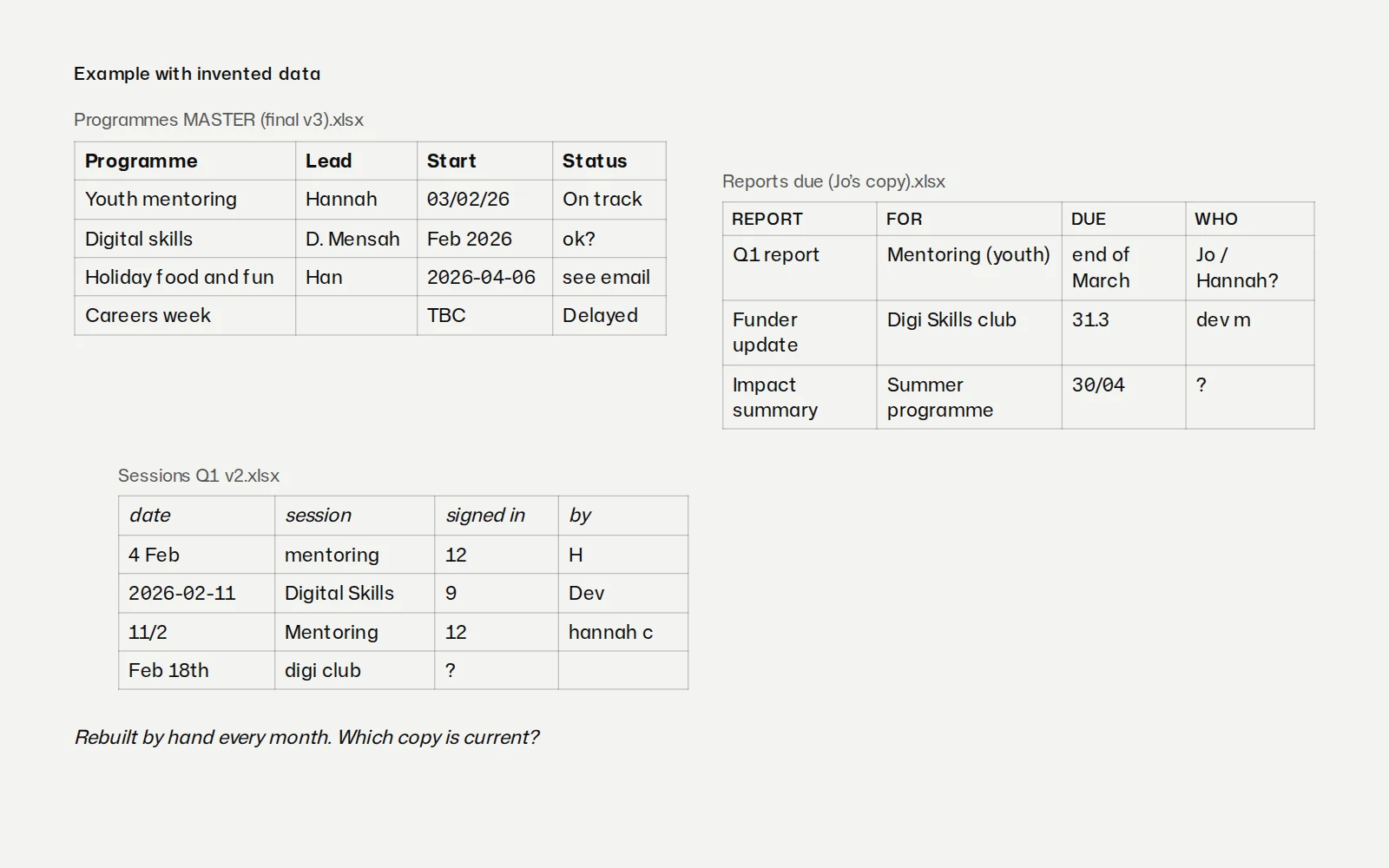
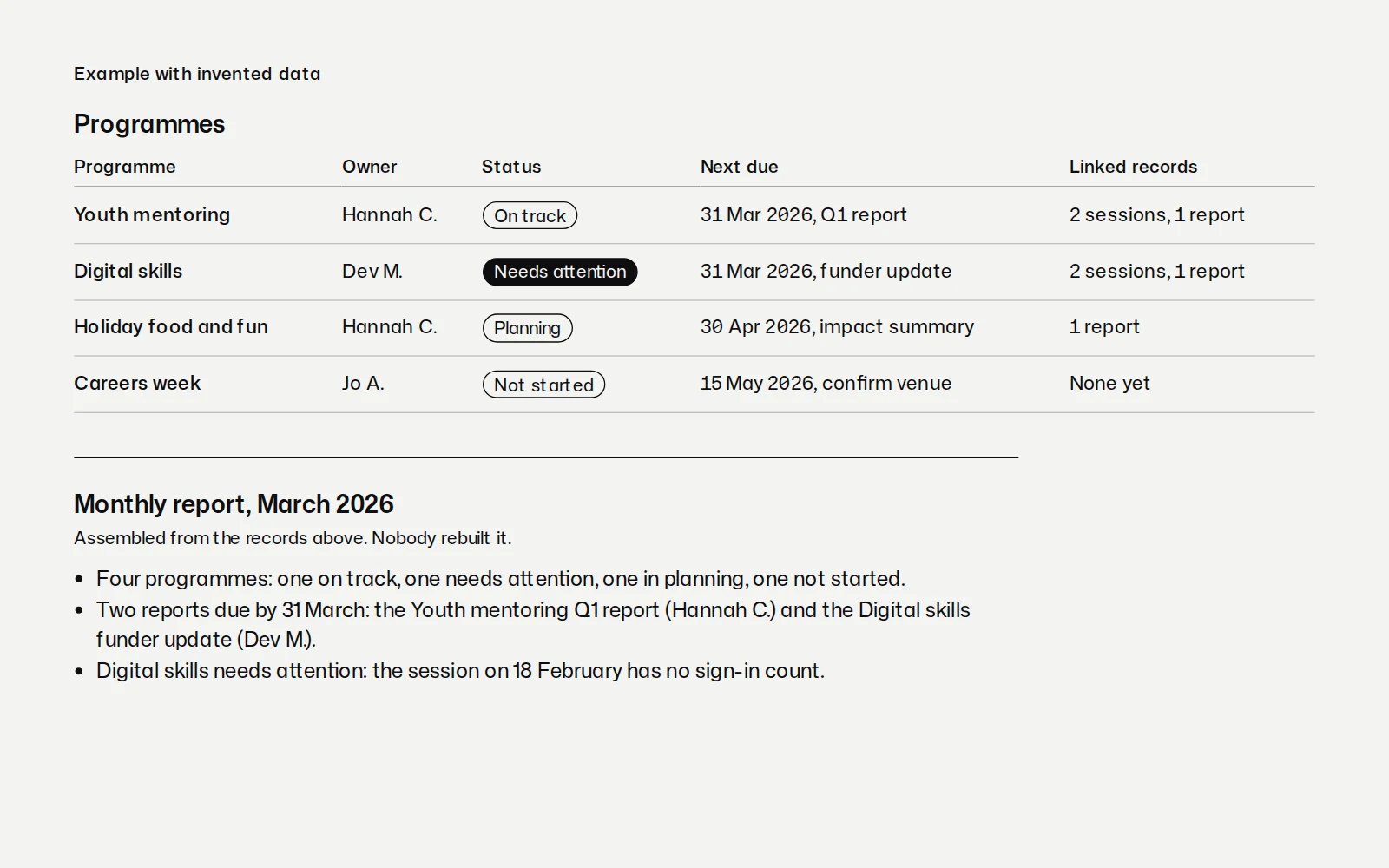
An example on invented data: a team that reports to its board or its funders every month. A firm at month end follows the same pattern, with clients in place of programmes.
Before. The programme list sits in one spreadsheet, the budget in a second and the monthly figures in a third. Updates arrive by email, and someone chases the ones that do not. At month end, someone copies figures from all three into a document and checks them by hand. Nobody can say who owns what, or what is late, without asking around.
After. One database lists every programme with its owner, next due date and status. Owners update their own records through a short form, and a reminder reaches them before a date slips. The report assembles itself from the data, ready for a person to check and send. Everyone can see what is late and who owns it.
The names, programmes and dates in the example are made up, and no client's information is shown.
Four ways to start
Start with whichever fits. One often leads to the next.
Process mapping
See how the work really runs before anything is built. We map one process with the people who do it, from the first form to the final report, and show where the retyping and chasing happen. It is the safest first step when you are not sure what you need.
- Who is on the call
- Dorotea and Rron Imami
- How it would run
- A sprint
- What to bring to the call
- The tools you use now, and the task your team repeats most. Describe your data rather than sharing it.
Databases and operations
One place your records live. We set up the database your organisation runs on, in Airtable, a similar tool or your CRM, so every client, programme or case has an owner and a due date that everyone can see.
- Who is on the call
- Dorotea and Rron Imami
- How it would run
- A project, then keep only if there is something to look after
- What to bring to the call
- The spreadsheets' names and what each one is for. Describe your data rather than sharing it.
Automation builds
Let the repeat work run on its own. A form entry lands in the right record, the monthly report assembles itself for a person to check, and the owner hears before a date slips.
- Who is on the call
- Dorotea and Rron Imami
- How it would run
- A sprint or a project
- What to bring to the call
- The task your team repeats most, and the tools it passes through.
AI assistants for teams
AI your team can check, with your data kept out. We set up an assistant for bounded tasks, test it on examples before it goes live, and train the people who check its work.
- Who is on the call
- Dorotea and Rron Imami
- How it would run
- A sprint
- What to bring to the call
- The task you would like help with, and what your data can and cannot go near.
Who this is for
Growing businesses where staff retype the same figures every month and month end takes days. There is more on working with growing businesses, including how the brand, the website and the admin can come from one studio.
Charities and mission-led organisations whose funder reports are rebuilt by hand, and whose records need to stay where they control them. There is more on working with charities.
If your brand or website needs work as well, the same people do that too: see brand and websites.
Also part of this work
Two more kinds of work sit here until each has a page of its own.
Internal tools and dashboards
When the tools you have cannot do the job, we build one that can: an internal app your team opens every day, or a dashboard your board or your funders can read without a briefing.
Training for your team
We train the people who will use the system, in short sessions built around their own work. The same goes for tools you already pay for but rarely use, AI tools included.
How we use AI
We use AI tools where they are reliable, people decide and check everything, and your data stays out of them unless you agree. Each AI step is tested before it goes live, and where it falls short, the step stays with a person. If you would rather not use AI at all, we design the work without it.
What stays in your hands
We work in the tools you already pay for. We start with what you have, before anyone buys anything new.
Your data stays where you control it. In your own accounts, under your own permissions.
No AI on your data without your agreement. We ask first. If the answer is no, we design the work without it.
Documentation and training for your team. Written in plain English, so whoever joins next can pick it up.
Every file we make is yours. The database, the automations, any code and the written instructions.
Once the system is live, your team runs it. If you would rather we looked after it, that is a monthly arrangement, offered only when there is something to keep.
How a project runs
It starts with a call about how the work runs now. We ask what exists today, what has to be true and by when, who decides, and what a good result would look like. We do not talk price on the call.
Before any work starts, you get a written scope: the problem in your words, what is included and what is not, who does the work, the dates and the fixed price. While we build, you get a weekly look at real progress. At the end we check the work against the scope with you, then hand over the instructions and train your team. There is more on how a project runs, step by step.
Who you will work with

Dorotea, Head of Workflow and Automation. Dorotea has managed programmes for London councils and non-profits since 2019, improving the workflows, databases and automations behind them. At Giant Entity she sets up the database and the automations around it, in the tools a team already has, and leaves the team able to run it without us.
Rron Imami, Co-founder and Creative Director. Rron designs the systems behind his own work, where AI tools take on bounded tasks and the decisions stay with him. He also designs product UX, from flows to dashboards, so the forms and screens your team uses make sense the first time.
More about the people behind the studio.
Systems we run ourselves
Rron built these for his own projects first. Each is drawn from its real structure on the systems on the Work page; the systems themselves are private.
One board for every project
Each piece of work posts its own status, and every change is kept as a dated record. Anything that needs a yes reaches the owner's phone as two buttons; if nobody answers, it takes the safe option and records that it did. In daily use since June 2026.
Nothing waits unseen
A small always-on computer reads the business inbox and the site's comments on a timer and checks the sites are up. Each new item is sorted by plain rules, with no AI, and sent to the owner's phone with a next step. It never replies, deletes or publishes. Site checks since August 2026; the inbox and comment watchers since September 2026.
A morning briefing from sources you chose
Overnight it collects new posts, a language model picks the day's items and quotes them, and a script checks every quote and link before anything is published. Running since September 2026.
A style guide that checks every draft
Copy, pages and secrets are checked automatically before anything goes live, and a person still looks. In use since July 2026.
Questions about workflow and automation
What does a workflow and automation studio do?
A workflow and automation studio maps how a team's work really runs, puts the records in one database with an owner for each, and lets the steps people repeat run on their own. At Giant Entity that means working with the people who do the work, in the tools the team already has, so that reminders and the monthly report stop being someone's job.
Do we need to replace our spreadsheets or buy new software?
No, we start with the tools you already pay for, such as Excel, Microsoft 365, Google Workspace or Airtable. If something new is needed, the written scope says what it is and why, before anyone buys it.
Will our data go into AI tools?
Not unless you agree. We ask first, and if the answer is no, we design the work without AI. Where you do agree, each AI step is tested before it goes live and a person checks what it produces.
Who looks after the system once it is live?
Your team does, with plain-English documentation and training from us. If you would rather we looked after it, that is a monthly arrangement, offered only when there is something to keep.
There are more questions, answered on the FAQ page.
Book a call
Tell us what eats your week. A call about how the work runs now and which steps could run themselves, with Dorotea and Rron. Before any work starts, you get a written scope.
Not sure which? Plan your project