One place your records live.
We set up the database your organisation runs on, in Airtable, a similar tool or your CRM, so the records that now live in several spreadsheets sit in one place. Every record has an owner and a due date that everyone can see. It is part of our workflow and automation work, for growing businesses, charities and programme teams in London and across the UK.
Who is a database set-up for?
It suits a team whose records have outgrown the spreadsheets they started in. If any of these sound familiar, it is worth a call:
- You keep clients, programmes, cases or projects in more than one spreadsheet, and the copies disagree.
- Reporting to your board or your funders means rebuilding the figures by hand.
- You already have a CRM or an Airtable base, and nobody uses it the way it was meant to be used.
- If one person left, the only working knowledge of the spreadsheets would leave with them.
What you get
One database for the records your team works from: clients, programmes, sessions, reports due, whatever your work is made of.
Every record with an owner, a status and a next due date, in views each person can use: their own list, what is late, what is due this month.
Short forms, so people update their own records instead of sending updates by email.
Your existing spreadsheets moved in and checked with you before anyone relies on the new copy.
Permissions set in your own account, so each person sees what they should.
Written instructions in plain English, and short training sessions built around your team's own work.
Every file we make is yours: the database, its settings and the instructions.
How it runs
A call about the records you keep now. We ask what exists today, what your reports need to show, who decides, and what a good result would look like. We do not talk price on the call.
A clear process first. If the way the work runs is not settled, we start with process mapping, so the database fits the work rather than the other way round.
A written scope before any work starts: what the database holds, who owns what, what is included and what is not, the dates and the price.
The structure, shown on invented data. You see how a record, a view and a form will work before any of your own data goes in.
A weekly look at real progress, in the database itself.
Your records move in. We check them with you, then train the people who will use it.
Your team runs it. If you would rather we looked after it, that is a monthly arrangement, offered only when there is something to keep.
What to bring
- The spreadsheets and lists you work from now, or blanked-out copies of them.
- The reports you have to produce, and who reads them: your board, your funders, your clients.
- The tools and licences you already have, such as Microsoft 365, Google Workspace, Airtable or a CRM.
- The person who can approve permissions, and whoever looks after data protection for you.
An example
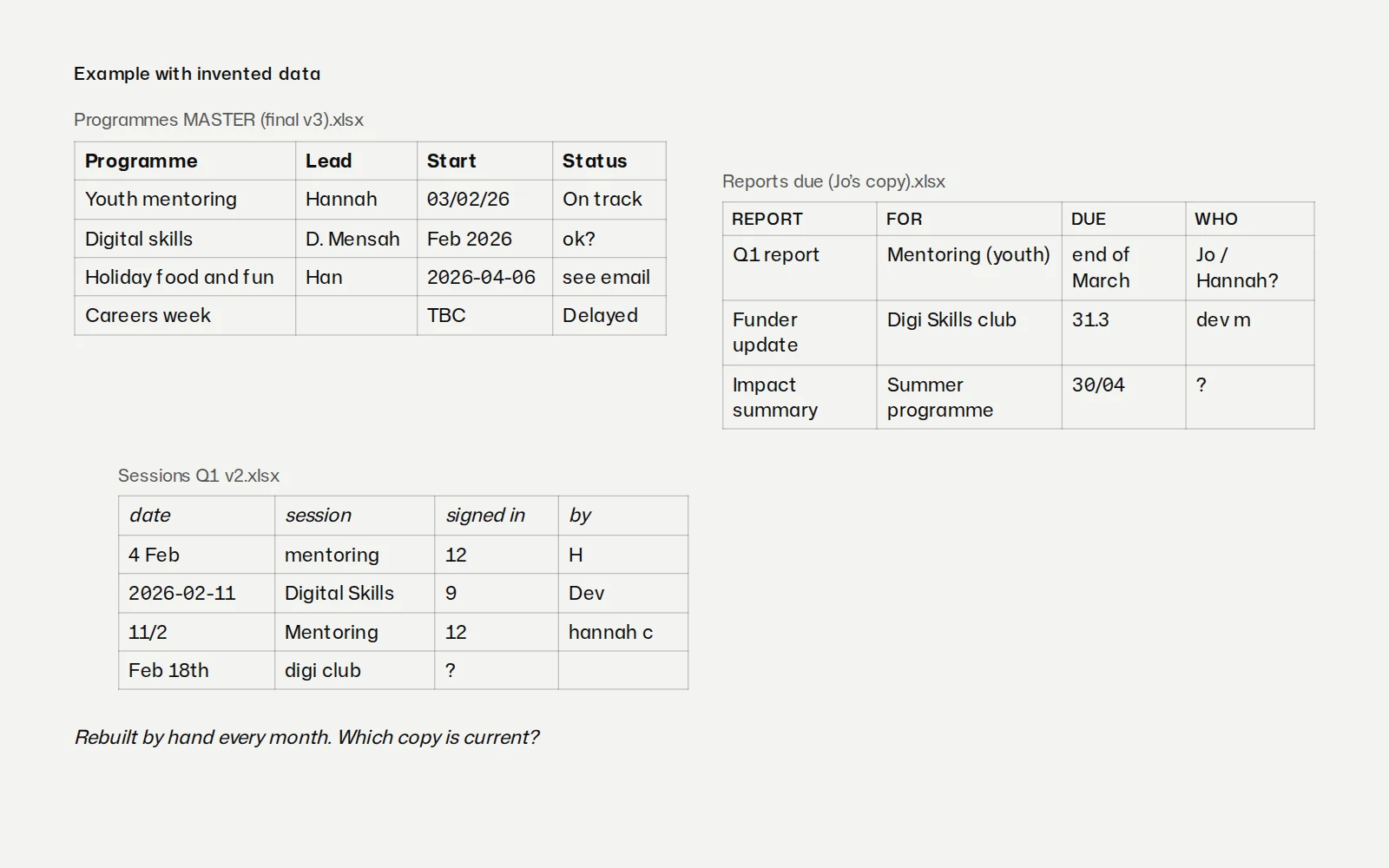
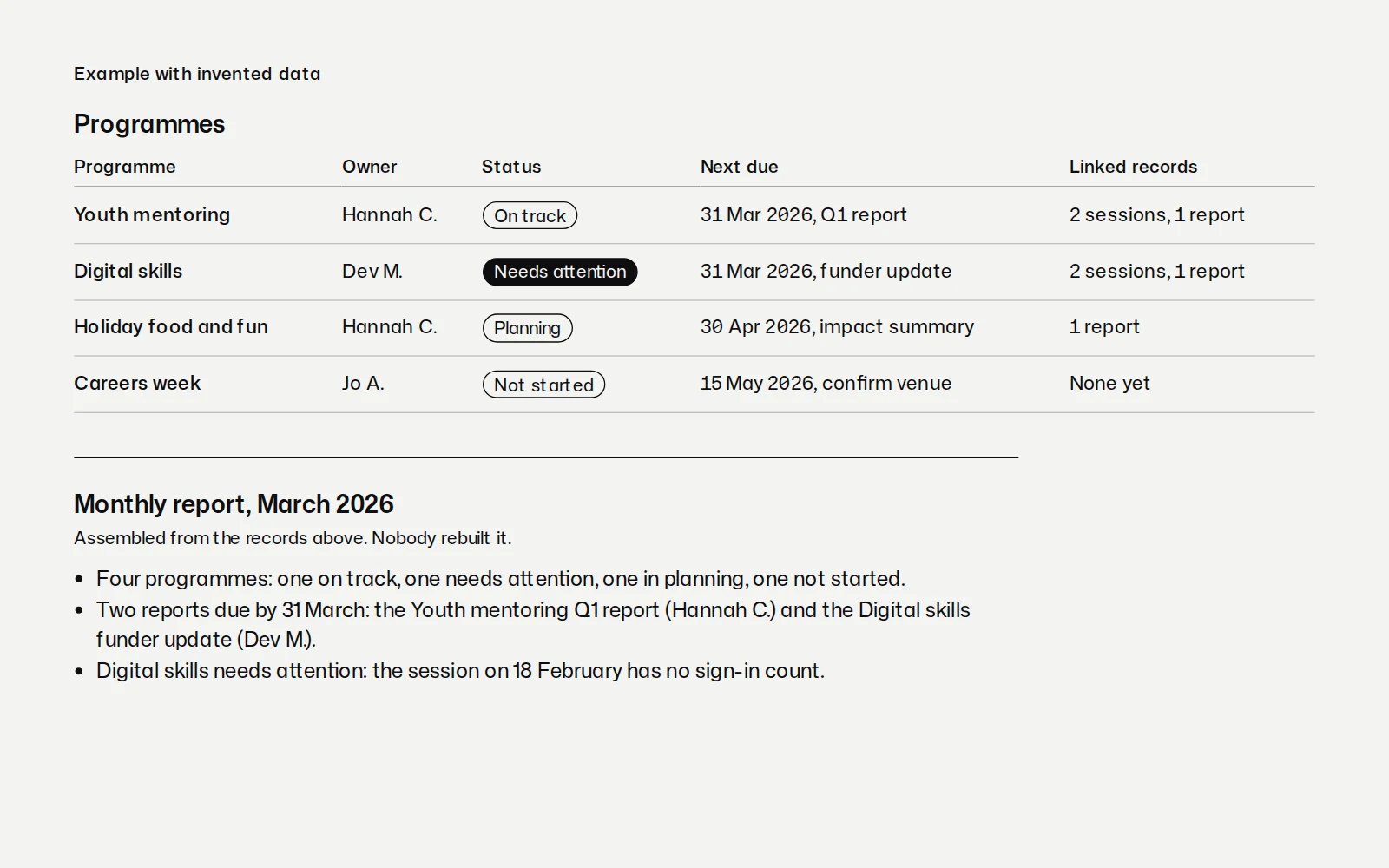
This is an example on invented data, not a client's database. A team that reports to its funders every month moves from three spreadsheets to one database. Each programme has an owner, a status and a next due date, and owners update their own records through a short form. Linked records show the sessions and reports that belong to each programme.
In the example, the database shows straight away that one programme needs attention because a session on 18 February has no sign-in count. Nobody had to go looking for it. Add reminders and reports that run on their own, and the monthly report assembles itself from the same records, ready for a person to check. You can see the monthly report example on the Work page.
Databases and the screens around them
People judge a database by the forms and views they open every day. Rron Imami designs product UX, from flows to dashboards, so those screens make sense the first time: see product and UX design. Charities and programme teams will find more on working with charities, including how funder reporting fits in.
Questions about databases and operations
Do you only work in Airtable?
No, we work in Airtable, in similar tools, or in the CRM you already have, and we start with what you already pay for. If a new tool is needed, the written scope says which one and why before anyone buys it.
Can you move our existing spreadsheets into the database?
Yes, we move your existing spreadsheets in and check the records with you before anyone relies on them. Where the copies disagree, we agree with you which one is right before it goes in.
Who owns the database once it is built?
You do: it sits in your own account, under your own permissions. Every file we make is yours, including its settings and the written instructions.
Will our team be able to run it without you?
Yes, your team runs it, with plain-English documentation and short training sessions built around their own work, so whoever joins next can pick it up. If you would rather we looked after it, that is a monthly arrangement, offered only when there is something to keep.
What about personal data and UK GDPR?
Your records stay in your own accounts, and nothing moves until we have agreed with you, in writing, who can see what. We are not data protection advisers: what is lawful, and what consent you hold, stays with whoever looks after data protection for you, and we build the database to follow those decisions. None of your data goes into AI tools without your agreement.
Book a call
Tell us where your records live now. A call with Dorotea and Rron about the spreadsheets you work from and the reports you owe. Before any work starts, you get a written scope.
Not sure which? Plan your project